Chapter 7
Not a Plan, but a Pause Button I Could Actually Press
The trade-off between ReAct and Plan-Execute, and why sometimes you have to kick the AI out of the execution stage
Quick summary: when to let the AI improvise, when to lock it into a Plan-Execute pipeline, and what that trade-off costs.
Skip if: you only want the one-line conclusion: high-risk tasks get a frozen plan, exploratory tasks get free rein.
How to read this chapter: we start with where this design really came from (a pause button you can actually press on a running agent) → use an everyday “kitchen recipe” analogy to split the two execution styles → break down the three weak spots of the common think-as-you-go pattern (ReAct) → get to fibon’s answer: wrapping plan-first execution into a
plan_and_executetool with four stages of separated powers, plan → human review → execute (brain steps aside) → synthesize → then add the three “structured interventions” that give a rigid plan its flexibility back → and close by being honest about the three costs of this design. Once you reach “What Plan-Execute costs you,” you’ve seen the core. The closing “Implementation details” collect three appendices (context control on long runs and the “fat turn” bug, a glance at the pre-orchestrated Workflow engine, and why not ToT / LATS) as optional reading.
Where this chapter really started: a pause button that works
The starting point of this architecture may sound backwards: what I wanted first wasn’t a plan. It was a pause.
After the previous chapter split the brain (Brain) from the hands (Worker), there was a by-product I didn’t pay much attention to at the time: since every action has to be dispatched from the brain to the hands, there are natural gaps between one action and the next. I stared at that call chain and thought: aren’t these gaps ready-made checkpoints?
The scenario I wanted was very concrete. You ask the agent to plan a trip. It starts checking the weather, then hotels. Halfway through, you suddenly think “oh, look up attractions too” — no need to cancel and start over, just drop the new task in. Or you realize you gave the wrong instructions, or left out a condition, so you force-stop the whole thing and keep the results it already fetched. And because every step is dispatched asynchronously, you don’t have to sit there waiting for it to finish before you can speak. Tasks run in the background, you interject whenever you like. That’s real multitasking. Holding all of this up is one implicit requirement: at any moment, the system must be able to answer “which step are we on, and what did each step return?” Auditability comes along for free.
But break “pause anytime, add tasks mid-run, force-stop” down and you hit an unavoidable premise: the system has to know what comes next before “where to interrupt” even means anything. ReAct thinks as it goes; until the LLM emits the next step, not even the system knows what it will be. So where would you pause? Between which two steps would you insert a task? Only when the steps are laid out as an explicit plan do the gaps between actions become handles a human can grab. In fibon, “plan first, then execute” was never the goal. It’s the means — a way to make a running AI stoppable at any moment.
Once that was clear, the industry’s two execution styles finally had a coordinate system to sit in.
A kitchen choice you make every day
Imagine you’re attempting a foreign dish you’ve never cooked before. You have a recipe. Which style do you cook in?
Style A: cook as you read (rolling adjustments). Open the recipe, read line one, “dice the onion” → grab the knife and dice. Read line two, “add tomato paste” → open the fridge and, oops, you’re out of tomato paste. So you take off the apron, turn off the stove, run to the corner store, come back, and read the next line. Upside: highly flexible, great at improvising around surprises. Downside: the overall flow is unpredictable. You may realize halfway through that “I should have started the stock half an hour ago, it’s too late now.” The final dish is luck, and when it goes wrong you can’t tell which step failed.
Style B: plan first, then cook (architect thinking). Before lighting the stove, read the recipe cover to cover, rehearse it in your head, list every ingredient, write a precise shopping list, buy everything in one trip, lay out the mise en place, then follow steps one-two-three-four in strict order. Upside: predictable and controllable. No mid-cook scramble over missing ingredients; if the flavor is off, the log makes it easy to pinpoint which step went wrong. Downside: no real-time flexibility, and it feels rigid. If the recipe itself has a misprint (say, an extra zero on the salt), your brain won’t second-guess it; you’ll follow the wrong list to the end.
Neither style is inherently good or evil. It’s all about the setting. Cooking familiar home dishes for a few friends on a weekend? Style A is fine. But if you’re the executive chef of a top catering company preparing a hundred dishes for a royal banquet tonight, you must run Style B and operate the whole pipeline on a plan.
In most tool-calling interfaces, the most natural way for an LLM to run — and the way it’s most often designed to run — is Style A. But once you put AI into serious, high-frequency personal-assistant production use, Style A’s downsides show their true face. This chapter is about how fibon takes these two styles apart at the foundation and picks between them.
The weak spots of the common ReAct pattern (Style A)
In many agent frameworks, tutorials, and production implementations, the most common tool-execution pattern is some form of ReAct (Reasoning and Acting). It’s Style A as an infinite loop:
[ User submits a task ] ──> LLM thinks (Reason) ──> calls tool A (Act) ──> reads the result (Observation)
                                                                          │
   ▲                                                                      ▼
   └──────────────────────────────────────────────── LLM thinks again (Reason)
                                                                          │
                                                                          ▼ calls tool B (Act)
                                                       [ Repeat until the AI decides it's done ]
In this loop, every step the AI takes is a new cloud LLM API call, and the next step is improvised from whatever text the previous tool returned. This “feel the stones as you cross the river” approach looks like genius on exploratory tasks. The textbook example is bug fixing: read the error log → guess which line is wrong → change it → run the tests → a new error appears → adjust again based on the new error. For chaotic tasks that genuinely need to evolve with intermediate results, ReAct fits well. But drop ReAct into a routine, deterministic assistant task and three fatal weaknesses show up:
- Weak spot 1: the execution trace isn’t reproducible. An LLM is a statistical machine with randomness built in. Ask it the exact same question twice and the tool-call sequence underneath can come out completely different. For a dead-simple task like “fetch the latest model list from the official site and report back,” you want it to reliably go “fetch page → filter text → synthesize.” Under ReAct, it’s up to fate: this time it fetches the page, next time it runs a Google search, the time after that it fobs you off with stale memory. The trace is uncontrollable.
- Weak spot 2: failures land in a black box, and debugging is miserable. In a ReAct loop, the “planning brain” and the “tool-running hands” are kneaded into the same LLM process. When the user sees a wrong answer, you open the logs and can’t tell whether the upstream brain planned wrong on round three, or a midstream external API returned garbage that the brain didn’t notice. It’s all mixed together, and short of re-running, you have nothing.
- Weak spot 3: the user loses the right to know, and side-effect APIs fire blind. Every ReAct step calls external APIs immediately, mid-conversation, sight unseen. The human never sees the plan as a whole. If the brain goes off the rails on step five and writes something absurd, then by the time you notice, the side-effect tool has already run in the background. The breakup email is already sent; last month’s payroll row is already wiped. You never even get the chance to click stop.
How fibon builds Style B: planning and execution, fully separated
🟢 Status: implemented. The four-stage
plan_and_executepipeline in this section (Planner → Checkpoint → Dispatch → Synthesize) runs in the repo today; the planning, review, dispatch, and synthesis nodes inplan_execute/nodes.pyare all complete. As of 2026-07-07, the three mid-run interventions (including frontend breakpoint marking and mid-run pause/stop) have full frontend-backend integration. Remaining rough edges are disclosed at the end of the chapter.
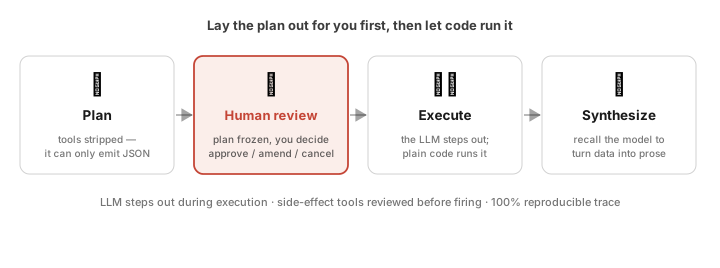
Following the opening thread — no plan, no interruption points — and along the way shutting off the security risks of ReAct’s blind sprint, fibon made a directional decision: wrap Style B (plan first, then execute) into a core built-in tool named plan_and_execute, registered in the unified tool registry. Whenever the Butler senses that a task belongs to the serious-assistant category (multi-step, cross-dependent, and heavy with physical side effects — “plan my five-day Kyoto trip with flights and hotels,” “on the 1st of every month, audit all my SaaS renewals and warn me before each charge”), it calls plan_and_execute from inside its ReAct loop. The moment the call triggers, control passes to the underlying code, and the system switches into a four-stage pipeline where the LLM’s powers are forcibly separated:
[ plan_and_execute triggered ]
             │
             ▼
Stage 1: Planning (Planner) ───> strip the LLM of all tools; it can only type out a structured JSON plan
             │
             ▼
Stage 2: Review (Checkpoint) ──> risk triage: low-risk plans auto-approve (a read-only card keeps you informed)
                                 medium/high-risk plans freeze first; a panel waits for the human verdict
                                 (⚠ current behavior: a 5-minute timeout still auto-approves; not the end state,
                                  see "The three-round amendment cap")
             │
             ▼
Stage 3: Execution (Dispatch) ─> separation of powers: the LLM leaves the execution line; pure code runs the pipeline
             │
             ▼
Stage 4: Synthesis ───────────> wrap-up. The LLM is called back to turn the collected data into natural language
Stage 1: Planning (Planner) — strip the tools, force the brain to be a pure architect. For the call where the brain writes the plan, fibon sends the API request with the tools list set to empty. Under that constraint the LLM loses every privilege to touch browsers or databases. It can’t fumble around; the only intelligence it’s allowed to exercise is writing an honest, structured JSON plan:
{
  "needs_worker": true,
  "rationale": "The user needs contract research plus a meeting schedule. I must fetch the latest pricing page first, then call the scheduler.",
  "steps": [
    { "order": 1, "tool": "read_page",      "args": {"url": "https://docs.anthropic.com/v1/pricing"} },
    { "order": 2, "tool": "summarize_text", "args": {"input": "step1.output"} },
    { "order": 3, "tool": "add_schedule",   "args": {"title": "Contract review biweekly", "time": "2026-06-09T10:00:00+08:00"} }
  ]
}
It spells out which tool each step calls, with what arguments, and how one step’s output feeds the next. This plan isn’t written to move a human reader. It’s written for the code dispatcher underneath.
Stage 2: Review (Checkpoint) — freeze the execution line, hand the wheel back to the human. Risk triage comes first: once the plan is persisted, a risk assessor scores it. Low-risk plans (pure queries, no side-effect tools) skip the popup and proceed, but a read-only plan card is pushed into the chat stream so you know what happened, with a one-click switch on the card that says “ask me first for this kind of thing from now on” (it writes your per-user checkpoint_mode preference: plan_only by default, every_step, or off). What freezes and pops up is the medium/high-risk plan: the execution line halts, Brain sends a WebSocket signal through the gateway, and a plan_preview panel appears with the full step list, the DAG-validated execution layers and topological order, and the computed risk assessment. Two fields you might expect, estimated duration and estimated token cost, aren’t in the payload yet; they’re on the roadmap. At this point sovereignty returns to the human and the system waits for one of three choices. The ugly part first: this “waiting” currently auto-approves after a five-minute timeout. That’s the current state, not the intended end state. “Fail-closed for any plan containing high-risk side-effect steps” isn’t built yet; the trade-off and roadmap are laid out honestly in “The three-round amendment cap.” The three choices: [Approve] (run it); [Amend] (you type natural language — “plan looks good, but after the step-2 summary, add a step: email the summary to Nina” — and fibon takes your intent back to Stage 1 to re-plan; these natural-language re-planning rounds are capped at 3 to keep the conversation from looping forever); [Cancel] (you spotted something dangerous, kill the task).
Stage 3: Execution (Dispatch) — separation of powers; the LLM is escorted out of the loop. The moment the human clicks approve, the chapter’s key design takes the stage: the reasoning LLM is escorted out of the execution loop by code. For the long minutes the tools run, the system is governed by a dispatcher with zero randomness in it, written in plain Python (dispatch_node inside Brain: it lives in the same LangGraph flow as the planner, but at this node the LLM has no decision power at all; it’s mechanical logic dispatching along the DAG topology). The dispatcher works like a strict factory foreman with the user-signed JSON plan in hand: step 1 says read_page → notify the Worker container to fetch the page; the data lands → apply the argument mapping exactly as the JSON specifies and feed it into step 2’s summarize_text.
The operational guarantee of a de-LLM’d execution stage: for the seconds or minutes the tool pipeline runs, the LLM gets no opportunity to reach into the execution line. How each step is called and which arguments go in were frozen into the JSON plan long ago. Architecturally, this severs one specific attack path: “the AI reads poisoned web content mid-execution (prompt injection), gets talked into changing the plan, and fires dangerous tools on its own.” Note the wording. What’s severed is injection’s path into the control flow, not all prompt injection; poisoned data can still contaminate a single step’s output, but it can no longer change what runs next. Here’s what a plan_and_execute-orchestrated workflow actually looks like as it moves through the microservices:
sequenceDiagram
  actor User as Human at the screen
  participant FE as Frontend (Astro/Vue)
  participant GW as Gateway (control plane)
  participant DB as PostgreSQL
  participant BR as Brain (core process)
  participant WK as Worker (sandbox gatekeeper)
  User->>FE: clicks "Run Workflow"
  FE->>GW: POST /workflows/{id}/run
  GW->>DB: INSERT run history (status='running')
  GW->>BR: gRPC: ExecuteWorkflowStep
  Note over BR: Stages 1 & 2 passed and persisted<br/>entering Stage 3: pure-code dispatch
  Note over BR: Step 1: llm_call step — the LLM invoked as a "tool"<br/>(text output only; routing stays in pure code)
  BR->>BR: freeze tool list, render prompt, generate text
  BR->>DB: UPDATE step_logs (Step 1 completed)
  BR-->>GW: pointer: next_step_id = 'step2'
  Note over BR: Step 2: tool call (tool_call)<br/>zero LLM involvement
  BR->>WK: gRPC: ExecuteMcpToolCall
  WK->>WK: runs the tool in the isolated sandbox / MCP (read_page)
  WK-->>BR: returns clean data
  BR->>DB: UPDATE step_logs (Step 2 completed)
  Note over BR: Step 3: conditional branch (condition)<br/>eval() banned; allowlisted operators only
  BR->>BR: safe filter evaluates: e.g., if (result.status == 200)
  BR-->>GW: pointer: next_step_id = 'step4'
  Note over BR: Stage 4: Synthesis
  BR->>BR: LLM called back to write the natural-language wrap-up
  BR-->>GW: final report: next_step_id = NULL (all done)
  GW->>DB: UPDATE workflow_runs (status='completed')
  GW-->>FE: SSE broadcast: workflow.completed
  FE-->>User: renders the clean final report
One easy misreading to defuse right away: Step 1 in the diagram is an llm_call, which looks like the LLM sneaking back into the execution line. It isn’t. llm_call is one of the Workflow engine’s nine step types; here the LLM is a worker the plan explicitly hired, producing a piece of text and nothing more, no different in kind from read_page fetching a page. Where to go next (next_step_id) is always decided by pure-code routing. “The brain steps aside” means it gives up control-flow power, not that no step may use an LLM.
Two engineering constraints are buried down in the code here. First, eval() is banned from condition evaluation: when Step 3 handles a plan’s dynamic branches (condition steps), fibon’s backend refuses at the source level to call Python’s built-in eval() (one injected line in malicious page content could ride eval() out of the sandbox to a host shell). The workflow condition filter is entirely hand-written dead code, a minimal parser supporting exactly seven allowlisted operators: >=, <=, !=, ==, >, <, contains. The dumbest approach, and the most dependable one. Second, context-length control on long runs: as steps advance, accumulated trace logs snowball. fibon uses hard truncation (history carries only the last N=2 turns) plus offloading intermediate results into state/event cards to keep the context at a low watermark. The evolution of this defense, and the recently caught “one ‘hi’ carried twenty-five thousand tokens” fat-turn bug, are in Implementation detail 1 at the end of the chapter.
Stage 4: Synthesis — call the brain back to do what it does best. Only after the dispatcher finishes the whole plan and gathers the hard data does the code invite the reasoning brain back into the room, hand it the results and logs as settled facts, and issue the final instruction: “the user originally asked X; we ran steps 1 through 5 for them on a pure-code pipeline; the clean data is below. Use your gift for language to weave this into a graceful, warm answer.” At this stage the LLM holds “integrate and package” permissions only. It can distill step 1’s findings and step 3’s results into a layered summary, but the power to say “I don’t think there’s enough data, let me run one more tool” has been stripped. Execution is over; all it can do is polish the words. The separation of powers closes its loop here.
Assembly line vs. autopilot: two independent axes
Behind this are two fully independent, parallel control axes. Compare them to the two schools of the automotive world:
The autopilot school (ReAct): the car makes high-frequency black-box decisions every moment it’s moving (brake now? accelerate? change lanes?). Wonderfully adaptive, but every judgment carries a probability of error, and after a crash you can dig through the black box and still not figure out which millisecond of shifting light triggered the hallucination. The assembly-line school (Plan-Execute): the robot arms on a factory floor, every motion welded in place by code (station one drives screws → station two sprays paint → station three inspects). Zero flexibility, but every re-run repeats the exact same motions with the exact same parameters, so when a product comes out flawed, an engineer can pinpoint the clogged paint valve at station two in seconds.
                  [ User types an everyday instruction ]
                                │
                                ▼
         [ Enters the SmartChatStrategy brain (settled 2026-05-26) ]
          (legacy General/Smart toggle removed; five-channel RAG on by default in production)
                                │
                                ▼
                  [ Brain interprets the intent ]
                                │
      ┌─────────────────────────┴─────────────────────────┐
      ▼ vague, needs iterative exploration                 ▼ multi-step, side effects, serious task
Runs as: [ 🏎️ ReAct autopilot ]                      Runs as: [ 🏭 plan_and_execute pipeline ]
(think as you go, adapt on the fly)                  (brain steps aside; pure-code dispatcher runs it)
Of the two axes, the “chat mode” axis was collapsed on 2026-05-26 by ADR-028: the once-switchable General and Smart chat modes became a false choice after three patches (cache optimization, dynamic tool RAG filtering, the N=2 history window) pushed Smart’s cost down to par with General. The whole system now runs a single SmartChatStrategy, and the frontend toggle is gone.
So in today’s fibon, the only axis still alive is execution style. And even that switch isn’t the user’s problem: it’s a high-level tool the Butler invokes on its own, inside its ReAct loop, based on what you say. Ask “what’s the weather in Taipei today?” and the brain classifies it as a simple single-turn query, declines to invoke the planner, and answers in a second via ReAct. Ask “plan my five-day Kyoto trip next month, distill the highlights, and set calendar reminders” and the ToolSelector’s tool RAG surfaces plan_and_execute into this turn’s candidate list; the Butler reads the multi-step, side-effect nature of the task, calls it, and hands control to the pure-code dispatcher. You don’t need to know any of this architecture. Talk to it like a smart personal secretary and the backend takes it from there.
The three-round amendment cap: why the review stage needs a circuit breaker
Rewind to Stage 2, the review. As mentioned, once the AI produces a JSON plan, you can push back in natural language (Amend) and force a rewrite. Here fibon carves a hard rule into the control plane’s finite-state machine: natural-language amendment rounds are capped system-wide at 3 (Max Amendment Turns = 3).
Why install an amendment circuit breaker here at all? Because in stress testing I watched the “non-converging nesting-doll” scenario with my own eyes: round 1, the AI produces plan v1 → the user adds a comment; round 2, v2 → the user reorders steps; round 3, v3 → the user suddenly wants a brand-new edge case handled… Without a breaker, this kind of natural-language revision, given the randomness of a probabilistic model, can mathematically fail to converge at all. The task never reaches execution, and every extra round fires another expensive Planner call at the cloud while the token bill climbs.
Three isn’t the output of some careful calculation; it’s an engineering hunch. In ordinary assistant scenarios, zero to one round of light touch-up is enough to align the brain with human intent. Three rounds (MAX_CHECKPOINT_ROUNDS = 3) is the tolerance margin left for both sides to make mistakes and self-correct.
Why dare to design it this way? It’s a sober risk-tiering ledger. Any plan that reaches this point has already passed DAG validation and risk assessment, and plan_and_execute handles everyday assistant work (fetching pages, scheduling, summarizing). The operational cost of a task frozen in waiting forever — an overnight automation hung for good, every task stalled the moment you walk away from the keyboard — outweighs the risk of releasing an already-validated plan. The counterexample is Chapter 5’s self-evolution Approval Gate: there the AI is modifying fibon’s own source code, a different risk class entirely, so approval_service.py runs a 30-minute fail-closed timeout. No human nod means rejected; any gRPC failure, any exception, all of it tips toward rejection. Same system, two timeout policies, matching two very different blast radii. Upgrading plans that contain high-risk side-effect steps to fail-closed (while the rest stay fail-open) is already on my roadmap; for now I’m writing down the current state honestly rather than pretending it exists.
One more old claim to correct: this “3” is not some system-wide unified cap. Chapter 2’s delegation cap is indeed 3, but the ping-pong cap between spawned sub-agents defaults to 5. Three mechanisms, three numbers, each guarding its own boundary.
Giving a rigid plan its flexibility back: three structured interventions
🟢 Status: implemented (frontend-backend integration completed 2026-07-07). All three interventions work end to end, frontend through Brain: the
checkpoint_nodeedit gate, frontend breakpoint marking with the breakpoint set sent back,amend_nodedynamic changes, and mid-run Pause/Stop controls. Remaining rough edges are in the honest note at the end of this section.
Fair challenge. This used to be the collective sore spot of agent frameworks: once a plan entered execution, you lost the right to steer, and all you could do was watch it fail or cancel the whole task and rewrite the prompt. In 2026 the primitives for pausing and approval have been landing across the major frameworks (who has built what, and what differentiation fibon has left, is fully accounted in Deep Dive I, “The industry spectrum of execution control,” shipping with the Deep Dive series on open-source day). fibon’s answer is to assemble those primitives into out-of-the-box behavior: on the skeleton of the pure-code dispatcher, three “structured interventions” let a human reach in and grab the wheel at any point mid-run.
Intervention 1: direct plan editing before execution (Pre-Execution Edit). At the Stage 2 review gate, alongside the usual [Approve] button, the plan card has an edit mode. No prompt-wrangling required: change a step’s arguments right on the panel, delete an unnecessary step, add a new one, or reorder the causality (inter-step dependencies re-wire automatically). Submit, and the dispatcher executes your adjusted plan as-is. This is the cheapest intervention in the whole system, costing exactly zero tokens.
Intervention 2: breakpoints between steps. When the plan is presented at Stage 2, you can click the breakpoint marker on any step to plant a safe interrupt (“after step 3 fetches the contract, hold and wait for my word”). The system also suggests breakpoint positions from where you’ve hit the brakes before (adaptive_checkpoint); keep them or dismiss them. The moment the pure-code dispatcher finishes step 3 and sees the marker, it suspends in the background and pops the control panel back up with the raw data step 3 just fetched, waiting for one of three calls: [Continue] (data looks right, release step 4); [Stop] (the intermediate data already answers the question, everything further is waste, wrap it up early); [Edit] (the data is not what anyone expected, so you rewrite the upcoming steps 4 and 5 on the spot, and the dispatcher picks up the new plan and continues seamlessly from the breakpoint).
Intervention 3: natural-language interception mid-run (Dynamic Amendment), the highest-freedom option. This was the hardest code to write in the whole mechanism. At any instant during execution (even while a tool is crunching away in the sandbox), you just type a sentence into the chat: “wait — the quote it fetched looks wrong. Skip the calendar steps, email Nina instead and ask what’s going on.” The message first passes a cheap-model intent classifier (amend / status / unrelated, single-word output, and any failure falls back to treating it as an amendment so nothing gets dropped): asking “how far along are we?” reads progress straight from the database and answers instantly, no Planner involved; saying hi won’t accidentally trigger a re-plan. If it really is an amendment, Brain’s await_node (the LangGraph node whose whole job is waiting, subscribed to both the plan:{run_id}:results and plan:{run_id}:amend Redis channels) catches the message and triggers a dynamic revision: the backend wakes one Planner call, packing in your sentence, the data from the three steps already executed, and the remaining unexecuted steps; the brain reads your intent and locally rewrites the remainder (the three persisted steps stay intact; the not-yet-run calendar steps are dropped and a freshly planned email step takes their place). Once the revised plan passes DAG validation, the dispatcher picks it up and continues from where it stopped.
[ 🏭 Dispatcher grinding through plan steps 1 ──> 2 ──> 3 ]
                                          │
              [ Interrupt: user types a natural-language Amend mid-run ]
                                          │
                                          ▼ (Redis broadcast wakes amend_node)
                    [ Planner locally rewrites the remaining plan ]
                                          │
                                          ▼ (DAG validation passes)
[ 🏭 Dispatcher picks up the new plan, continues seamlessly ──> step 4 (Email) ──> 5 (End) ]
Back to the pause button from the start of this chapter: Intervention 2’s breakpoints are that button in pre-planted form, and Intervention 3 is its natural-language version. There’s also a literal button. While a plan runs, the frontend always shows [Pause] (the dispatcher gets the signal before dispatching the next layer and opens the same panel a breakpoint would) and [Stop] (kill the unexecuted steps, keep the finished results, and let the synthesis stage report honestly on what got done and what never ran). And the “adding a dish mid-meal” case from the opening (halfway through trip planning: “look up attractions too”) rides the same amend channel, with the new steps planned into the tail of the remaining work. The three things this chapter set out wanting — pause anytime, add tasks mid-run, force-stop — all land here.
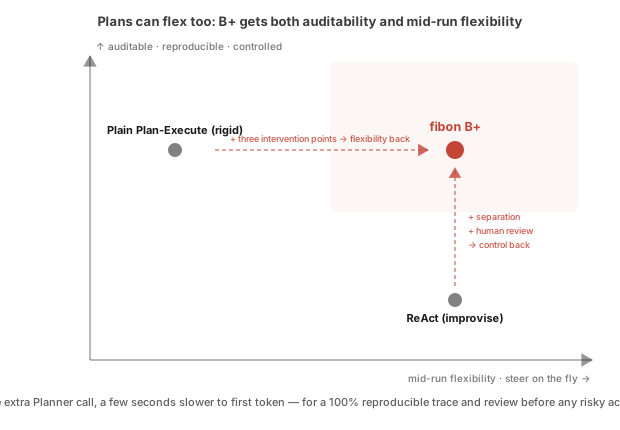
Put fibon’s Style B+ (Plan-Execute with the three structured interventions) side by side with traditional Style A (ReAct) for a final tally:
| Operational dimension | Traditional Style A: ReAct | fibon Style B+: Plan-Execute + three interventions |
|---|---|---|
| Who triggers mid-run turns | Entirely up to the LLM’s mood as it reads the chat history (automatic, but a black box you can’t predict). | Mostly in the human user’s hands, exercised through 3 interventions (deliberate and predictable). |
| Debt from already-executed tools | The AI swerves on its own; tools that already ran wrong have made irreversible changes to the world. | Finished steps are preserved and persisted as assets; unexecuted risky steps are erased, and nothing is paid for twice. |
| Audit and compliance | The failure trail is a tangle of chat context, impossible to replay or audit. | Every steering intent and every revised JSON plan leaves precise step_logs in PostgreSQL, fully replayable and auditable. |
This also answers a common prejudice: that plan-first systems are doomed to be rigid. Not necessarily — a plan and a pipeline can have real dynamic flexibility, as long as that flexibility is built on structured interventions that are predictable, auditable, and respectful of human sovereignty.
To pull the whole chapter into one sentence:
ReAct leaves the flexibility to the AI. Plan-Execute hands control back to the system. fibon is after a third thing: let the flexibility exist, but make every exercise of it pass through an intervention point a human can see, review, and trace.
No free lunch: what Plan-Execute costs you
The upsides are covered. Once again, every architecture has its downsides and limits, so here are the three costs this one pays:
- Cost 1: when the router misjudges, you pay for one extra LLM call. By design, a trivial question (“what’s in
my_notes.txt?”) should never enter the pipeline: the Butler routes it to ReAct and picks upread_fileon the first turn. But the line is drawn by semantic judgment, and no judgment is error-free. The moment the Butler mistakes a simple task for a serious one and callsplan_and_execute, the system spends a full Planner round to produce a one-step JSON plan, burning Planner tokens and wall-clock time for nothing. The real name of this cost is misjudgment cost, and the more conservatively you draw the line (better to over-review than under-review), the more often you pay it.
- Cost 2: streaming feels worse, because TTFT gets longer. Under ReAct the AI streams while it thinks and the typewriter starts immediately, which feels great. Plan-Execute is strictly staged (wait for the Planner to finish the JSON → wait for the database write → wait for the dispatcher to run the tools → only at synthesis does the typewriter start), so the first two or three seconds of a conversation are a loading spinner.
- Cost 3: steering the plan requires a deliberate human action. Unlike ReAct, where the AI sees your new message and silently swerves inside its black box, any change to a fibon plan requires you to click the edit controls (Interventions 1 and 2) or send an explicit correction message (Intervention 3). It asks something of you, and gives up that disposable-chatbot feeling of “everything just reacts automatically.”
Implementation details
Implementation detail 1: context control on long runs, and the 'fat turn' bug for engineers
From compression to offloading (TD-61). As a long run advances, trace logs snowball. Early on there was a CompactionService sentinel that compressed history once it passed 80% of the model window, but TD-61 removed it: compression destroys auditable detail, which collides with the white-box principle. The replacement is two moves: hard truncation (CONVERSATION_HISTORY_WINDOW, default N=2 turns) plus offloading intermediate results into state/event cards, keeping context at a low watermark.
The fat-turn bug (caught 2026-07-06). Truncating by turn count has a hole nobody planned for: N=2 guarantees the last two user turns, but says nothing about how expensive those turns are. Real case: the user’s previous message was “summarize this security news article,” and the AI pulled a full browser snapshot of the page, sidebar ads, related-article lists, social embeds and all. The next message was just “hi” — and that “hi” hauled over twenty-five thousand input tokens and took more than seven seconds to answer. The window never exceeded two turns; one of the turns was simply obese, and it blew the whole window out.
The fix direction. For turns that have already ended, keep only the user message and that turn’s final plain-text reply when assembling the prompt; the tool-call details in between stay out of history entirely. Mind the protocol trap here: every major provider requires that an AIMessage carrying tool_calls be immediately followed by its paired ToolMessage, or the API rejects the request outright. So you can’t just filter out the ToolMessages; the whole call-plus-result pair has to come out together. The full raw trace (tool_call_logs) still lands on disk untouched, and if the user later asks “what exactly did that tool find?”, the AI calls a built-in tool that reads the historical records. Same philosophy as offloading facts into cards: the short-term conversation keeps the skeleton, and details are fetched on demand.
Implementation detail 2: the third path for recurring tasks — a glance at the Workflow engine for engineers
Some multi-step tasks run the exact same pipeline every day or every week (weekly news digests, monthly vulnerability audits). Sending those through plan_and_execute so the brain can re-derive the same plan is pure token waste. So fibon built a separate pre-orchestrated Workflow engine in the control plane, aligned with the Temporal school of design: the plan is frozen as a workflow definition in the database, and execution makes zero Planner calls. It’s a third growth path beyond ReAct and Plan-Execute, with its own step-type system and versioning/fork mechanics. It’s related to this chapter but doesn’t belong to it, so this is just a wave hello; the full teardown lives in Deep Dive H, “The pre-orchestrated Workflow engine.”
Implementation detail 3: why Plan-Execute, and not Tree of Thoughts (ToT) or LATS? for engineers
Academia and open source have spent the past two years promoting advanced reasoning patterns: ToT (tree-of-thoughts search), LATS (language agent tree search), ReWOO and friends, which let an AI grow a whole decision tree, backtrack, and prune itself. After a round of reading the papers, fibon’s conclusion was: no. Four reasons, one line each:
- Wrong arena. Tree search shines on hard-reasoning problems with huge answer spaces and tiny error tolerance; a personal assistant’s compound tasks are fundamentally multi-step scheduling, and a linear plan covers them.
- Auditability. A linear JSON plan is something a human can read at a glance and approve on a frontend panel; a tangle of fifty thought nodes pruning and backtracking against each other cannot be explained to an ordinary user, and human-in-the-loop review collapses entirely.
- Token cost. A linear plan’s cost scales linearly with step count and can be estimated up front; tree search grows exponentially with depth and breadth, and an AI playing chess against itself overnight can burn tens of thousands of calls, which betrays the core goal of driving token costs down.
- The reasoning-model dividend. By 2026, native reasoning models (with built-in extended thinking) have folded the backtrack-and-prune work into the model itself: route the Planner to one of these and what comes out is already a clean linear plan, making another ToT framework layered on top redundant engineering.
On balance, Plan-Execute is the highest-ROI choice.
That wraps the question of “who signs off on an untrusted sequence of steps, and how a human keeps eyes on it before and after execution.” The next chapter switches reading modes entirely: we lay the whole log back onto a timeline for a chronological review — back to the days of architecture torn down and rebuilt, of endless collisions with LLMs — and watch how fibon grew from its first line of code into what it is today, including which designs were right from day one and which took the long way around. See you in Chapter 8.